發表文章

目前顯示的是 7月, 2017的文章

Python 繪製三角函數圖形

圖片
問題:「如何使用Python來繪製 三角函數 圖形呢?」 OK,在繪製圖形前,先來了解 Python 的數學程式庫( Mathematical functions )有哪些,從3.6.2的文件可看到如下: 9.2.1. Number-theoretic and representation functions 9.2.2. Power and logarithmic functions 9.2.3. Trigonometric functions 9.2.4. Angular conversion 9.2.5. Hyperbolic functions 9.2.6. Special functions 9.2.7. Constants 在Trigonometric functions一節中可查到底下三個: math. cos ( x ) Return the cosine of  x  radians. math. sin ( x ) Return the sine of  x  radians. math. tan ( x ) Return the tangent of  x  radians. 所以可以用這三個數學函數來繪製。但是Python有比上面函式還好用的程式庫,叫做 NumPy 。使用 NumPy 可以快速產生繪圖資料。接下來要處理繪圖的功能,在 Python 的程式庫中,有 Matplotlib 可用,就用此程式庫來繪圖囉。 範例程式: 輸出圖: 若您覺得文章寫得不錯,請點選文章上的廣告,來支持小編,謝謝。 If you like this post, please click the ads on the blog or  buy me a coffee . Thank you very much.

mBlock Scratch Extension for Otto Robot

圖片
Hello everyone, the mBlock extension for otto robot is introduced in this article. 大家好,本文會介紹 mBlock 的 otto 擴展積木。(Download: Otto  ) Manage Extensions in mBlock, select Otto Extension. 在mBlock 的擴展管理器選擇 Otto。 The bluetooth code  https://github.com/OttoDIY/PLUS/tree/master/Bluetooth%20codes/OTTO_BT is used in this extension. 要使用此擴展,須將Otto的程式更新為官方的 OTTO_BT 程式。 After uploading OTTO_BT code to otto, it can be interacted with this mBlock extension(in Scratch mode). 將 OTTO_BT 程式上傳到 OTTO 控制板上,就可以使用此擴展與mBlock互動。 The extension blocks: Demo Video: "What is Otto ? Otto is an interactive robot that anyone can make!" Otto是什麼?Otto是自己可以製作的互動機器人! For more information, please go to  http://otto.strikingly.com/  . 詳細介紹請至官網  http://otto.strikingly.com/ 。 若您覺得文章寫得不錯,請點選文章上的廣告,來支持小編,謝謝。 If you like this post, please click the ads on the blog or  buy me a coffee . Thank you very much.
PHP 教師研習筆記

圖片
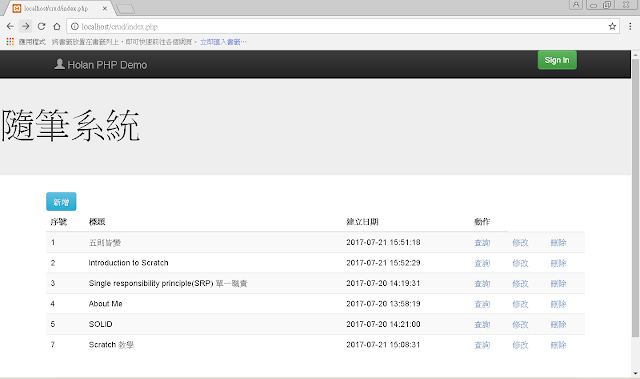
上周三至周五(7/19~7/21)參加由雲林縣縣網所舉辦的教師研習:「 PHP 程式設計」。講師的教學網頁為: http://163.27.230.30/~kwc/PHP_MySQL/ 。 講師的授課大綱如下: Day 1 PHP開發環境建立 XAMPP Visual Stduio Code PHP基礎程式設計 工欲善其事,必先利其器。先從如何建立好開發環境講起,講師特別推薦 Visual Stduio Code 來開發PHP程式,並搭配 XAMPP 來安裝WebServer、DB與PHP環境。接著講解PHP程式語言的基礎語法。 Day 2 PHP進階程式設計 MySQL資料庫 Adminer phpMyAdmin 資料庫新增、查詢、修改、刪除( C reate, R ead, U pdate, D elete) PHP與MySQL資料庫 延續前一天的PHP語法講解,主要集中在PHP的類別與方法部分,接著說明如何使用PHP做檔案的上傳,再來就是MySQL資料庫的使用與CRUD的SQL語法。 註:在檔案上傳的部分,有同學遇到底下的問題: Notice: Undefined variable... 原因是因為  enctype="multipart/form- data " 打成  enctype="multipart/form- daya " 或是檔案的變數名稱不相同。 Day 3 BootStrap git版本控制 隨筆系統 介紹BootStrap,並使用BootStrap建立一個隨筆系統的首頁,搭配git版本控制來做程式碼的版本管理,最後以一個隨筆系統作為練習。 筆者最後一天的成果截圖: 若您覺得文章寫得不錯,請點選文章上的廣告,來支持小編,謝謝。 If you like this post, please click the ads on the blog or  buy me a coffee . Thank you very much.

mBlock Extension for Arduino Esplora mBlock的Esplora擴展

圖片
此擴展為筆者所製作的,可在 mBlock 的擴展管理器下載: 也可至 mBlock 的官網下載: http://www.mblock.cc/extensions/ 。 在 Scratch 模式中,有幾個感測器需要在積木程式中做轉換(這是因為從積木程式得到的數值是未經過轉換的Raw Data),需要做轉換的有 三軸加速計的X、Y、Z軸。 溫度感測器。 搖桿的X、Y軸。 而在 Arduino 模式中,就不用做這些轉換的,因為 Arduino IDE 的內建 Esplora Library 已有做轉換了。 mBlock範例程式下載: Scratch Mode Example:  ScratchMode 。 Arduino Mode Example: ArduinoMode 。 參考資料: [1] http://www.mblock.cc/docs/create-extensions-for-mblock/ [2]  如何使用 mBlock 與 Arduino Esplora 互動 若您覺得文章寫得不錯,請點選文章上的廣告,來支持小編,謝謝。 If you like this post, please click the ads on the blog or  buy me a coffee . Thank you very much.

如何使用 mBlock 與 Arduino Esplora 互動

圖片
一、前言 在筆者文章一文: 在 S4A 軟體上玩 Arduino Esplora 有試過一些S4A的軟體,當初不知道怎麼用 mBlock 來與 Arduino Esplora 完整互動,就在最近在網路上找到了一些資訊,製作出可在 mBlock 的積木指令。 二、相關知識 因為 Esplora 上有多種感測器與硬體裝置(見下圖,圖取自Arduino官網) 於是 Esplora 在硬體設計上使用多工器(型號為74HC4067DB)來處理,所以只要能對這個多工器做高低電位的訊號輸入,就能得到對應感測器的數值(見下圖),例如要得到A-TEMP溫度的數值,就要對多工器輸入0110 (低高高低)的電位訊號,再從A4類比腳位讀取數值。 所幸在 Scratch 中,可以利用腳位 18 到腳位 21 分別來控制類比腳位A0到A3,那麼在mBlock中讀取Esplora上的溫度之積木程式要怎麼做呢?下圖為參考做法。 上圖中溫度的轉換公式適從Arduino IDE 中 Esplora程式庫查來的,轉換的結果單位為攝氏。 三、mBlock 積木程式 根據以上資訊我們就可以製作出給 mBlock 使用的積木程式指令了。 在使用之前,記得將控制板選 Arduino Leonardo ,並且更新 Esplora 板子的韌體為 mBlock 所使用的版本。 mBlock積木下載處 參考資料: [1] SuperEasy-A4S 若您覺得文章寫得不錯,請點選文章上的廣告,來支持小編,謝謝。 If you like this post, please click the ads on the blog or  buy me a coffee . Thank you very much.

Python 金字塔圖案 ( Pyramid Pattern in Python )

圖片
如何用 Python 畫出金字塔圖案呢?下圖是金字塔圖案之一 此圖形已有人寫出很棒的教學了 ==> Java For 迴圈範例 。於是筆者打算將問題一般化,先看底下的圖形: 要怎麼用Python來畫出上面的菱形呢?學過直角坐標嗎?直角坐標系統又稱作 笛卡兒坐標系統 ,此系統可以用來解決這些有規則的圖形,見下圖的提示。 於是我們可以寫個 Python 一次劃出上圖三種菱形的程式碼: 那讀者您知道怎麼畫出三角形了嗎? 若您覺得文章寫得不錯,請點選文章上的廣告,來支持小編,謝謝。 If you like this post, please click the ads on the blog or  buy me a coffee . Thank you very much.

自製Arduino藍牙遙控器 ( Arduino Project: Build a Customized Bluetooth Controller )

圖片
一、前言 (Preface) 在製作 Arduino 藍牙遙控器之前,我們先來了解藍牙的使用方式,以手機連接HC-06藍牙模組流程約有底下幾個步驟: Before building a customized bluetooth controller, there are several steps we need to know about using bluetooth communication. For example, the following steps are for connecting HC-06 with a smart phone: 開啟手機藍牙。 (Turn on bluetooth on a smart phone) 尋找 HC-06 藍牙模組。(Scan for the nearby bluetooth devices) 與 HC-06 藍牙模組配對。(Paire HC-06 with the smart phone) 開啟手機藍牙App。(Open a BT application on the smart phone) 使用手機藍牙App與 HC-06 藍牙模組連線。(Use the BT application to connect with HC-06) 此外在上述流程中,手機藍牙是當主控端 (Master),HC-06藍牙模組當從端 (Slave)。而我們需要將以上的流程先建立好在主控端藍牙模組 HC-05內,讓可以當主控端的 HC-05 藍牙模組在上電後就可以自動連線到 HC-06 從端藍牙模組。本文會以 Arduino Nano 藍牙小夜燈 當 Slave 端 (HC-06)與 Arduino UNO 版的 雙軸按鍵搖桿 當 Master 端(HC-05)。 The role of smart phone is bluetooth master . The role of HC-06 is bluetooth slave . HC-05(master) have to store the bluetooth master configuration in itself. After saving the bluetooth master configuration in HC-05(master), ...

與 Python 開發環境 anaconda 的初步接觸

圖片
最近在【 Python初學特訓班 】一書看到此軟體套件的介紹: 完全開源與免費。 支援Linux、Mac、Windows系統。 可自由切換Python 2.x 與 Python 3.x。 等.... 看到這三點,筆者就下載來用用看。 anaconda下載處: https://www.continuum.io/downloads 安裝完後(安裝部分可參考: 建立用於科學計算的Python開發環境 ),可在程式集看到下圖, Anaconda Cloud 開啟後會連上 Anaconda Cloud官網 ,此雲端服務需要註冊帳號才能使用,分為兩種方案:須付費的Private 與 免費的Public。 Anaconda Navigator GUI的方式來導覽 Python 應用程式與套件。 Anaconda Prompt Anaconda的命令列視窗,可用來下 anaconda 套件指令,上圖的 conda list 為顯示目前已安裝的套件之指令。 IPython Python 互動式視窗,可直接輸入 Python 的程式碼,按下 Enter 鍵後立即顯示結果。 Jupyter Notebook 為 IPython 的網頁擴充套件,可在 Browser 上執行 Python 程式。 Jupyter QTConsole 與 Anaconda Prompt 類似,此版本用 Qt視窗程式 開發出來的。 Spyder 這個就是 anaconda 所提供的整合開發環境(IDE)!!! Spyder整合了底下功能: 變數總覽。 檔案總覽。 簡易智慧輸入。 程式除錯工具。 若您覺得文章寫得不錯,請點選文章上的廣告,來支持小編,謝謝。 If you like this post, please click the ads on the blog or  buy me a coffee . Thank you very much.