發表文章

Tinkercad Circuits:一個腳位偵測多顆按鈕(Multiple Buttons with One Analog Pin)
圖片
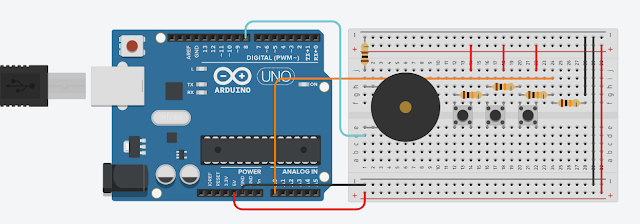
本文要說明如何使用一個Arduino Analog Pin 來偵測多個按鈕(Push Buttons)的其中一顆按鈕是否有被按下。 材料(Materials): Arduino UNO R3 x 1 Buzzer x 1 10K ohm Resistor x 4 Pushbutton x 3 100 ohm Resistor x 1 Small Breadboard x 1 電路(Circuit): 程式碼(The Code): 示範影片(Demo Video): 範例連結(Example Link): https://www.tinkercad.com/things/cUy3ztLD8cy 若您覺得文章寫得不錯,請點選文章上的廣告,來支持小編,謝謝。 If you like this post, please click the ads on the blog or  buy me a coffee . Thank you very much.

寫程式用的雲端 IDE(Cloud IDE for Programming)

要寫程式之前,得先將工具準備好,當所使用的程式語言有好多種,那前置作業就會很多,若只是要練習語法之類的話,那麼雲端 IDE 是個不錯的選擇,目前常見免費且不用建立帳號的雲端 IDE 有下面幾個: Here are some cloud IDEs for programming. And we don't need a account to use them. ideone:  http://ideone.com/ ,教學: https://www.techmarks.com/ideone-online-coding/ codepad: http://codepad.org/ ,教學: https://www.youtube.com/watch?v=8izi7QDEOHk CodePen:   http://codepen.io/ ,教學: https://www.minwt.com/webdesign-dev/html/11470.html JSFiddle:  https://jsfiddle.net/ ,教學: https://blog.miniasp.com/post/2011/02/07/Useful-tool-jsFiddle-Online-Editor-for-the-Web Tutorialspoint:  http://www.tutorialspoint.com/codingground.htm ,教學: https://codegym.tech/coding-ground/ Jdoodle:  https://www.jdoodle.com/ ,教學: https://www.youtube.com/watch?v=idN5QmUS8-8 其中的 Tutorialspoint 網站所提供的工具最完整,它除了多樣的程式語言外,還提供了一些 Terminal,如 MySQL、PowerShell、Node.js 等,此外 Tutorialspoint 也有豐富的教學資料,值得一看。 另外 CodePen 和 JSFiddle 只提供前端開發用的JavaScript + HTML + CSS。至於這些雲端 IDE 的使用方式大同小異,先在網頁上寫完程式碼,之後...

Arduino控制WS2812三色燈條

圖片
本文用到的材料為: WS2812B LED 燈條 x 1 Arduino UNO x 1 杜邦線公對公 x 3 軟體為 Arduino IDE 1.8.5 搭配 FastLED程式庫 。 安裝 FastLED 程式庫 打開Arduino 的程式庫管理工具(草稿碼 ==> 匯入程式庫 ==> 管理程式庫) 搜尋FastLED 安裝好FastLED就可以看到內建的範例程式 Arduino電路 LED燈條 5V 接 Arduion 5V LED燈條 GND 接 Arduion GND LED燈條 ID 接 Arduion Pin 5 接好電路後,筆者使用【檔案 ==> 範例 ==> FastLED ==> ColorPalette】來試試看,ColorPalette的Demo影片如下: 因為程式裡設定使用 50 顆 LED,所以此燈條沒有全部亮。 參考資料: [1] Guide for WS2812B Addressable RGB LED Strip with Arduino 若您覺得文章寫得不錯,請點選文章上的廣告,來支持小編,謝謝。 If you like this post, please click the ads on the blog or  buy me a coffee . Thank you very much.

Python Expressive Puzzlers 8: Does Equal

底下的Java程式會輸出什麼結果? 1 2 3 4 5 6 7 8 public class DosEquis { public static void main ( String [] args ) { char x = 'X' ; int i = 0 ; System . out . print ( true ? x : 0 ); System . out . print ( false ? i : x ); } } 輸出結果會是XX嗎?根據 JLS 15.25 的說明 ( true ? x : 0 ) 的運算結果會是char型別,而 ( false ? i : x ) 的運算結果會是int型別。所以輸出結果為 X88 。 而 Python 只有  < expression1 > if < condition > else < expression2 > 的語法,沒有 Java 的 conditional operator 的語法,於是不會有這樣子的Pitfall。 若您覺得文章寫得不錯,請點選文章上的廣告,來支持小編,謝謝。

Python Expressive Puzzlers 7: Swap

底下兩個Java Class分別會輸出什麼結果? 1 2 3 4 5 6 7 8 public class CleverSwapOne { public static void main ( String [] args ) { int x = 1984 ; int y = 2001 ; x ^= y ^= x ^= y ; System . out . println ( "x = " + x + "; y = " + y ); } } 1 2 3 4 5 6 7 8 9 10 public class CleverSwapTwo { public static void main ( String [] args ) { int x = 1984 ; int y = 2001 ; x ^= y ; y ^= x ; x ^= y ; System . out . println ( "x = " + x + "; y = " + y ); } } CleverSwapOne 會輸出 x = 0; y = 1984 ,而 CleverSwapTwo 會輸出 x = 2001; y = 1984 。為什麼會這樣子呢? 根據 JLS 15.7 的說明 :「Evaluate Left-Hand Operand First」也就是 CleverSwapOne  的執行順序如下: 1 2 3 4 5 6 7 // The actual behavior of x ^= y ^= x ^= y in Java int tmp1 = x ; // First appearance of x in the expression int tmp2 = y ; // First appearance of y int tmp3 = x ^ y ; // Compute x ^ y x = tmp3 ; // L...

「特洛伊木馬病毒程式設計--使用Python」讀後感

特洛伊木馬病毒程式設計--使用Python   此書在前言部分就說明, 請以學術研究的角度來看待此書 。這讓筆者想起多年前曾去參加一個資安的活動,內容是說明什麼是buffer overflow、stack overflow、SQL injection 等主題,而近幾年隨著 python 程式語言的流行,也越來越多用 python 來寫一些五花八門功能的程式。 而導讀部分也提到只要權限夠(通常用Kernel mode),用C/C++指標的功能可以存取到特定記憶體位址,進而做一些特異功能。此書透過檔案讀寫、網路功能、執行緒、鍵盤紀錄等四大程式功能來完成一個可收集 Windows User 按了哪幾個鍵盤。 而熟悉如何使用這四大功能的人,大概也不想看這本書了吧!底下列出一些參考資源給有興趣的人去研究。 1. Python File IO 2. Python Network Programming 3. Python Multithreading 4. Python Keylogger 依照這四大功能,此書從網路程式觀念開始慢慢地建立讀者的基本Socket程式觀念,接著說明如何用網路程式來傳送檔案以及通訊協定的介紹。之後,多工程式常用的執行緒上場了。然後就是最後一項功能:鍵盤紀錄(這方法限制在Windows系統上)。 OK,那麼本書的特洛伊木馬病毒程式範例到底是什麼呢?因為本書的範例是在虛擬機器上測試,而且相關的防火牆也需要關閉,也得開啟權限讓程式執行。而 這離真正的木馬程式還有一段路要走 。不過作者也提到,只要將程式修改,或是將觀念融會貫通並實作出來,就有機會越來越接近真實的木馬程式了。 BTW,書中提到一個數字:「1337」,想了解此數字代表什麼意思,請參考 這裡 ]-[3I23 或 那裡 7]-[3I23 。 若您覺得文章寫得不錯,請點選文章上的廣告,來支持小編,謝謝。 If you like this post, please click the ads on the blog or  buy me a coffee . Thank you very much.

Python Expressive Puzzlers 6: Multicast

底下的Java程式會輸出什麼? 1 2 3 4 5 public class Multicast { public static void main ( String [] args ) { System . out . println (( int ) ( char ) ( byte ) - 1 ); } } 結果不會是 -1。幸運的是有條簡單的規則來說明:「Sign extension is performed if the type of the original value is signed; zero extension if it is a char, regardless of the type to which it is being converted.」也就是 byte -1  === sign extension ==> char 65535 === zero extension ==> int 65535。 而 Python Built-in type 不多,筆者只試了底下兩行: print ( int ( str ( bytes (- 1 )))) print ( int ( chr ( bytes (- 1 )))) 輸出結果會是什麼呢? 若您覺得文章寫得不錯,請點選文章上的廣告,來支持小編,謝謝。 If you like this post, please click the ads on the blog or  buy me a coffee . Thank you very much.