發表文章

Tinkercad Circuits:NeoPixel Ring 水流模擬

圖片
本文使用TinkerCad Circuits來示範NeoPixel Ring的應用:「水流模擬」 材料(Materials): Arduino UNO R3 x 1 NeoPixel Ring x 1 Small Breadboard x 1 1K ohm Resistor x 2 Pushbutton x 2 電路(Circuit): 兩顆按鈕分別接在UNO的D3與D4,NeoPixel的In接在UNO的D2。 程式碼(The Code): 示範影片(Demo Video): 範例連結(Example Link): https://www.tinkercad.com/things/9p6iQyMyfO6 若您覺得文章寫得不錯,請點選文章上的廣告,來支持小編,謝謝。 If you like this post, please click the ads on the blog or  buy me a coffee . Thank you very much.

Tinkercad Circuits:LED 模擬走馬燈

圖片
本文使用TinkerCad Circuits來示範LED燈的應用:「走馬燈看板」。 材料(Materials): Arduino UNO R3 x 1 Small Breadboard x 10 220 ohm Resistor x 10 LED x 10 電路(Circuit): 十顆 LED 燈的陽極(Anode)分別接到 UNO 的數位腳位 2 ~ 11。 程式碼(The Code): 無使用陣列版本 使用陣列版本 示範影片(Demo Video): 範例連結(Example Link): https://www.tinkercad.com/things/70zn6GiiAsQ 若您覺得文章寫得不錯,請點選文章上的廣告,來支持小編,謝謝。 If you like this post, please click the ads on the blog or  buy me a coffee . Thank you very much.

Tinkercad Circuits:溫度警報器(Temperature alarm)

圖片
本文使用TinkerCad Circuits來示範溫度感測器的應用:「溫度警報器」。當溫度越高時,蜂鳴器的聲音就越快發出聲響,LED亮越多顆。 材料(Materials): Arduino UNO R3 x 1 Small Breadboard x 1 Buzzer x 1 100 ohm Resistor x 1 LED x 5 1K ohm Resistor x 5 Temperature Sensor x 1 電路(Circuit): 程式碼(The Code): 示範影片(Demo Video): 範例連結(Example Link): https://www.tinkercad.com/things/hHukUlwUIDM 若您覺得文章寫得不錯,請點選文章上的廣告,來支持小編,謝謝。 If you like this post, please click the ads on the blog or  buy me a coffee . Thank you very much.
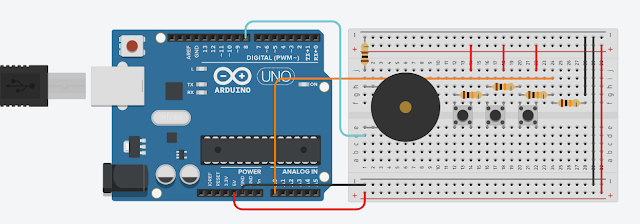
Tinkercad Circuits:一個腳位偵測多顆按鈕(Multiple Buttons with One Analog Pin)

圖片
本文要說明如何使用一個Arduino Analog Pin 來偵測多個按鈕(Push Buttons)的其中一顆按鈕是否有被按下。 材料(Materials): Arduino UNO R3 x 1 Buzzer x 1 10K ohm Resistor x 4 Pushbutton x 3 100 ohm Resistor x 1 Small Breadboard x 1 電路(Circuit): 程式碼(The Code): 示範影片(Demo Video): 範例連結(Example Link): https://www.tinkercad.com/things/cUy3ztLD8cy 若您覺得文章寫得不錯,請點選文章上的廣告,來支持小編,謝謝。 If you like this post, please click the ads on the blog or  buy me a coffee . Thank you very much.

寫程式用的雲端 IDE(Cloud IDE for Programming)

要寫程式之前,得先將工具準備好,當所使用的程式語言有好多種,那前置作業就會很多,若只是要練習語法之類的話,那麼雲端 IDE 是個不錯的選擇,目前常見免費且不用建立帳號的雲端 IDE 有下面幾個: Here are some cloud IDEs for programming. And we don't need a account to use them. ideone:  http://ideone.com/ ,教學: https://www.techmarks.com/ideone-online-coding/ codepad: http://codepad.org/ ,教學: https://www.youtube.com/watch?v=8izi7QDEOHk CodePen:   http://codepen.io/ ,教學: https://www.minwt.com/webdesign-dev/html/11470.html JSFiddle:  https://jsfiddle.net/ ,教學: https://blog.miniasp.com/post/2011/02/07/Useful-tool-jsFiddle-Online-Editor-for-the-Web Tutorialspoint:  http://www.tutorialspoint.com/codingground.htm ,教學: https://codegym.tech/coding-ground/ Jdoodle:  https://www.jdoodle.com/ ,教學: https://www.youtube.com/watch?v=idN5QmUS8-8 其中的 Tutorialspoint 網站所提供的工具最完整,它除了多樣的程式語言外,還提供了一些 Terminal,如 MySQL、PowerShell、Node.js 等,此外 Tutorialspoint 也有豐富的教學資料,值得一看。 另外 CodePen 和 JSFiddle 只提供前端開發用的JavaScript + HTML + CSS。至於這些雲端 IDE 的使用方式大同小異,先在網頁上寫完程式碼,之後...

Arduino控制WS2812三色燈條

圖片
本文用到的材料為: WS2812B LED 燈條 x 1 Arduino UNO x 1 杜邦線公對公 x 3 軟體為 Arduino IDE 1.8.5 搭配 FastLED程式庫 。 安裝 FastLED 程式庫 打開Arduino 的程式庫管理工具(草稿碼 ==> 匯入程式庫 ==> 管理程式庫) 搜尋FastLED 安裝好FastLED就可以看到內建的範例程式 Arduino電路 LED燈條 5V 接 Arduion 5V LED燈條 GND 接 Arduion GND LED燈條 ID 接 Arduion Pin 5 接好電路後,筆者使用【檔案 ==> 範例 ==> FastLED ==> ColorPalette】來試試看,ColorPalette的Demo影片如下: 因為程式裡設定使用 50 顆 LED,所以此燈條沒有全部亮。 參考資料: [1] Guide for WS2812B Addressable RGB LED Strip with Arduino 若您覺得文章寫得不錯,請點選文章上的廣告,來支持小編,謝謝。 If you like this post, please click the ads on the blog or  buy me a coffee . Thank you very much.

Python Expressive Puzzlers 8: Does Equal

底下的Java程式會輸出什麼結果? 1 2 3 4 5 6 7 8 public class DosEquis { public static void main ( String [] args ) { char x = 'X' ; int i = 0 ; System . out . print ( true ? x : 0 ); System . out . print ( false ? i : x ); } } 輸出結果會是XX嗎?根據 JLS 15.25 的說明 ( true ? x : 0 ) 的運算結果會是char型別,而 ( false ? i : x ) 的運算結果會是int型別。所以輸出結果為 X88 。 而 Python 只有  < expression1 > if < condition > else < expression2 > 的語法,沒有 Java 的 conditional operator 的語法,於是不會有這樣子的Pitfall。 若您覺得文章寫得不錯,請點選文章上的廣告,來支持小編,謝謝。